Questions, Answers and Tutorials
MagicZoom!!! It's the only Zoom tool you'll ever need for Davinci Resolve. Here's how it all works!
Watch the launch livestream here for a live demo, plus questions and answers!
Below are some short common questions and below that, you'll find some video guides to help you get started!
Please don't hesitate to contact me with any bugs, issues or general feedback.
All the time baby! I'm going to keep working on it until I'm happy. If you've bought it already, you're kinda in 'early access'. Although I'm really confident in the main Tools, I will also be adding some additional Presets for you as well shortly.
Yes! You can use the videos you create with MagicZoom for any purpose.
However, MagicZoom itself is not for resale and you cannot sell animation presets created with MagicZoom.
It's simply! Just download the Zip file, extract the zip and then double click the correct DRFX file:
MagicZoomPro - if you're on Davinci Resolve Studio
MagicZoomProFREEResolve - If you're using Davinci Resolve FREE
Davinci Resolve will open and ask if you wish to install.
Accept this and MagicZoomPro will be installed.
Within Davinci Resolve simply open the Effects Library and then browse to:
Effects > MagicToolkit > MagicZoom
If you need to uninstall MagicAnimate, or if you've accidentally installed it twice and need to remove one, it's quite simple.
Within Davinci Resolve, go to the Fusion page, open the Effects Library and right click on the Templates heading.
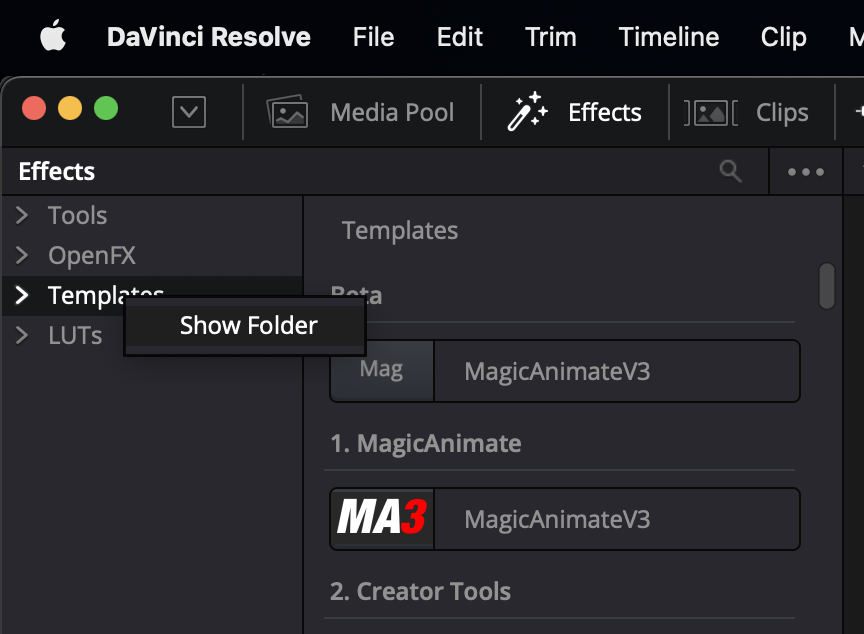
Then select Show Folder.
A window will open showing all the DRFX files you currently have installed, simply locate MagicZoomPro and delete it to uninstall/remove from your Davinci Resolve installation.
Thank you for your support and patience. Alex (27th February)