The Ultimate Zoom pack for Davinci Resolve!
- Standard Simple (super fast!) Zoom In/Out
- Multi Zooms! Unlimited Zoom Workflow
- Masking with borders and custom effects
- Adjust the Pitch/Yaw/Roll to give a 3D effect effortlessly
- There's even a built in Tracker!
Everything is quick, simple & easy to use with On Screen controls!
Includes Quick Access Presets PLUS the ability to create your own!
Important Notes:
Requires DaVinci Resolve 19.1.1 (2nd December!) at LEAST
The Tilt Shift Blur effect requires Davinci Resolve Studio! There is version included WITHOUT Tilt Shift for those on Davinci Resolve Free.
If you're on Davinci Resolve STUDIO please install MagicZoomPro, if you're on the Free version please install MagicZoomFREEResolve.
Hey all! It's been a while. Resolve 21 introduced a bug when using the MultiZoom feature specifically within the 'Mid' part. This has now been fixed!
I've taken some time working on other products but now actively working on some updates to these older ones so stay tuned!
Recent releases of DaVinci Resolve have caused some issues with Magic Zoom! Here is the fix!
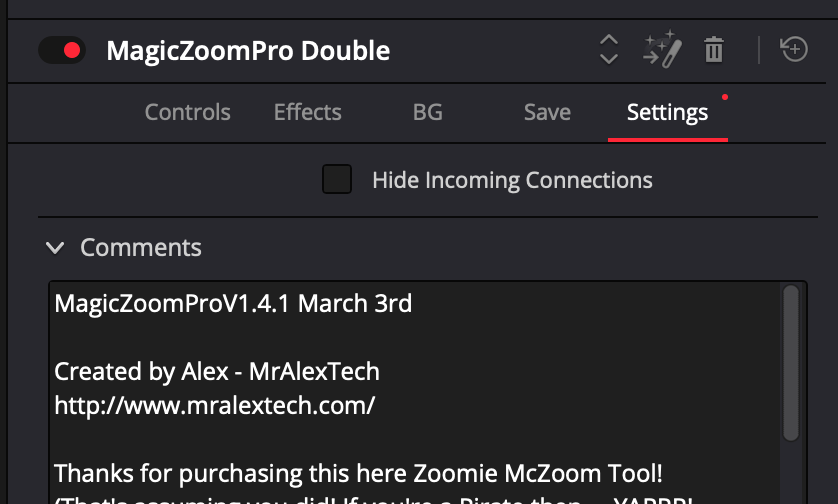
You can check the version but opening any of the Zoom effects in the Inspector and going to comments. This one is V1.4
(v1.4.1) Following feedback, I added Easing Controls for the Constant Zoom!
(v1.4.1) While I was there, I also added some additional filters to hide controls not required when switching between Constant Zoom and Static modes
(v1.4) Saver tool now works (most of the time!) directly on the Edit page. It's sweeeet!
(v1.4) Added some quick navigation buttons to MagicZoomPro to make tutorials etc faster
(v1.4) Totally reworked all the effects so now its way more efficient when disabled, which leads me to the next big update...
(v1.4) ALL the 'Effects' Tools have been removed as they're now longer required, the 'non' effects versions contain the effects but run really well with them turned off.
(v1.4) Added a switch for MotionBlur so its really fast when disabled (as fast as the old 'fast' version), while still being pretty quick when activated
(v1.3) Totally reworked how the Border works! It was annoyingly inefficient before and caused low FPS. So I've reworked it totally and it seems to be way faster (double fps on my Mac Mini). Still works with the Polygon Mask on Pop Outs too.
(v1.3) There were still come crashes occurring when double clicking to reset certain controls - Now fixed (I hope!!). I've gone through all of them. It took some work. The reason it was crashing is dumb and makes no sense but hopefully fixed now.
(v1.3) Update to the above... noticed that the Pitch/Yaw controls were also crashing. Fixed those too!
(v1.3) Fixed a few more minor issues with the Saver Tool in very particular circumstances.
(v1.2) Main Animation expressions etc in the back end have been updated! Improves efficiency and reliability and squashes those pesky bugs.
(v1.2) Name changes! I tried to do something smart with the naming initially and it was a bit of a fail. So I've renamed all the tools so it's simpler, and way easier to find what you want.
(v1.2) Deleted some tools. This isn't to give you 'less'. As above, I got carried away and made separate tools which were unnecessary. For example, Fast Effects. Using Effects slows the performance down more than removing the motion blur, so there was very little performance difference between Zoom Effects and Fast Effects. So I've simply removed the Fast Effects tool. If there's anything major missing, please do just let me know.
(v1.2) Similarly to above, there is no 'Fast' folder. The 'Fast' Zoom simply now sits within the top level MagicZoom folder. For those unaware, the Fast tool doesn't contain any motion blur, so it runs a little bit quicker overall than the regular MagicZoom (even with no Motion Blur actually being applied). So if you don't use the MotionBlur, the fast one is a great option.
(v1.2) Removed the ability to do Constant Zoom while using the Infinite Zoom workflow. This one is niche, I can't imagine this will affect many people. When using the Infinite/Multi zoom workflow, there was an option to also do a constant zoom. This sounds simple, but was actually an incredibly tricky thing to get to work and relied on a particularly complicated and heavy expression. To improve performance in all areas, this has been removed. You can still apply Constant Zoom within all the presets, just not within the Multi Zoom mode.
(v1.2) One of the recent updates also broke the 'Delete Unused Effects' button from with the Preset Creator tools but only on Windows. This has also been fixed.
I think that's most of it! Give it a try and let me know how it goes.
Same version as 1.1 but fixed an issue causing the 'You have reached a limitation with Davinci Resolve' pop up from appearing when running the Fast and Panning presets within Davinci Resolve Free.